
GeekShed IRC Network
New Connection Record – Apr 4, 2020
Jul 21st
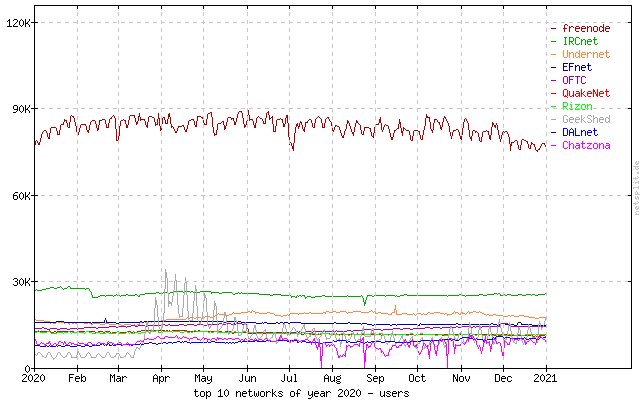
We average users between 5,000 – 10,000 depending on the time of day and yearly season.
GeekShed broke a new concurrent user connection record on April 4th, 2020 with a total of 35,034 users. This growth was primarily driven by a fast growing gaming channel and continues to bring in thousands of users each day. During this record breaking event we were on the top ten IRC networks according to netsplit.de. We continue to show up in the top ten in 2021.
Our response to this sudden spike in users lead us to add three new servers to the round-robin to load balance the connections. We also increased the maximum user limit per server as modern hardware allows them to handle more. At no point did we experience downtime or degradation of service during this event. When connections stabilized we returned to our smaller number of servers without incident.
GeekShed is proud to offer scalability no matter the size of your community. If you’re thinking about choosing IRC services and have a large number of users don’t hesitate to contact us. We’d love to get to know your needs and figure out the best solution.
You can reach us by clicking “Chat” on the top and using the Kiwi Chat Client. Change the Channel to #help to connect to our network support channel.
Thank you and we look forward to seeing you on GeekShed!
Graph: generated by netsplit.de
—posted by Amyashi
TFlash is just a memory, a Flash in the pan
Jul 20th
We have setup a Kiwi Client Chat link for your convenience now on the site
and instructions for you Webmasters to add it to your sites for your chatrooms, just visit the CHAT link above for more information, it replaces the old TFlash chat we’ve had for so long.
Have a great day on GeekShed ;-)
Tom Coyote Wilson and the GeekShed Staff welcome you!
GeekShed BNC’s no longer offered
Jul 20th
GeekShed no longer offers it’s BNC Service, it has come to an end.
What are other methods?
- Quassel IRC is a modern, cross-platform, distributed IRC client, meaning that one (or multiple) client(s) can attach to and detach from a central core — much like the popular combination of screen and a text-based IRC client such as WeeChat, but graphical.
- WeeChat Full-featured IRC plugin: multi-servers, proxy support, IPv6, SASL authentication, nicklist, DCC, and many other features
Have a great day on GeekShed ;-)
Tom Coyote Wilson and the GeekShed Staff welcome you!
New Staff: Amyashi, Holst, and Coyote`
Nov 25th
 Amyashi, Holst, and Coyote` have all recently kindly accepted our offer to join the GeekShed staff team. Network administration is not an easy job, and we are thankful for the time they have dedicated to us.
Please welcome Amyashi, Holst, and Coyote` to our staff and congratulate them on their new positions.
Round Robin Improvements
Feb 17th
 Bye, bye birdie! GeekShed is moving to an auto-geo-ip system that determines the best server to connect users too.
You no longer have to find the best round robin for your location. The new system should detect your location and route you to the best server for your location and situation.
The system includes some load balancing as well, so if the closest server is full, you will be routed to another, faster server.
To set up your client, simply use the irc.geekshed.net address no matter where you are. Note that we do not support ipv6 at this time.
Special Connection Round Robins
We also have round robins based on pools of servers with special capabilities. If you need these features, use one of these options:
- lightirc.geekshed.net if you’re configuring your copy of the LightIRC client
- bnc.geekshed.net if you’re using GeekShed’s free BNC service
If you have any difficulties with any of the servers, just join #help and someone will assist you.
Photo: Robin by John Haslam, on Flickr
—posted by Tengrrl/Bunny
The GeekShed Forums Are Back!
Sep 27th
 GeekShed’s Forums are back up and running, thanks to some investigation and work from Subwolf.
So go get online, post some news, add some comments and suggestions, give someone some script help, hang out in a channel forum, or ask for some network help. The Forums are ready for your messages!
Everything in the Forums should be restored and working as it did before our several-week hiatus. If you notice anything amiss, you can report what you see in #help. Thanks for your patience while we got things updated and back online.
—posted by Tengrrl/Bunny
Twitter Bot Upgraded
Jun 15th
 Twitter bot, the network bot that posts your Twitter updates in your channel, works with the new Twitter API now, thanks to some code wrangling by the admin, the tech, and the teacher, Allan Jude (also network staff). Hooray!
The bad news is that in the process of updating things recently, we discovered some corrupt information in the database the bot uses to determine which channels to join. Unfortunately some records were lost. If the Twitter bot hasn’t joined your channel again, you will need to register again. We apologize for the inconvenience.
If you weren’t using the Twitter bot, register now to have your status updates shared in your channel. It’s a simple process. Let us know in #help if you have any questions.
—posted by Tengrrl/Bunny
Featured Channel: #JupiterBroadcasting
Mar 3rd

#JupiterBroadcasting is the online chat and IRC home of Jupiter Broadcasting, the podcasting network currently producing six shows and streaming 24/7. The channel was founded by ChrisLAS on April 29, 2009.
What happens in the channel?
We’re a community focused around Jupiter Broadcasting, a podcasting network that produces high quality shows such as the “Linux Action Show” as well as many others. Our current lineup includes these shows:
- Linux Action Show (LAS)—The world’s #1 Linux podcast covers the best in the open source and Linux world.
- Coder Radio—A pragmatic look at the art and business of Software Development and related technologies.
- SciByte—Science and technology, in bite-sized (and delicious) chunks.
- Unfilter—A media watchdog, meme spotter, and topic deep diver.
- TechSNAP—The Systems, Network, and Administration Podcast covers stories that impact the tech industry.
- FauxShow—The network’s unofficial talk show, which features the chat room prominently in “The Lower Third.”
Each show is streamed live, and the channel is frequently featured, meaning you can chime in with your opinion while a show is being recorded. Between shows, the chat is always active with various topics of discussion, from Linux, to tech, to politics, to bacon.
What are the channel policies?
Our chat is very friendly and welcoming to people with differing opinions, as long as you are polite and courteous to your fellow chat members.
Anything else you want folks to know?
Join us live for our 100th episode of TechSNAP, a Systems, Network, and Administration Podcast! It’s sure to be a good time! Mark your calendar for March 7th, 4PM EST (or 2100 UTC)!
You can also find more resources on these pages:
- http://jblive.tv—Watch live or tune in in the off-time to watch some re-runs
- http://jblive.info—Catch the audio stream for live shows, or listen to the Jupiter Radio
- http://bit.ly/jbreddits—Submit a story to the subreddits for some of the Jupiter Broadcasting shows. Vote ’em up, and join the community!
- http://jbgame.tv—Join our new Gaming Community on Google+!
Want to have your channel profiled on the GeekShed website? Check out the requirements and use the online form to apply.
—posted by Tengrrl/Bunny
Channel Management Capabilities
Feb 21st
A channel on the network can have six different kinds of users. You might think of them as levels of permission and access. They are, in increasing amount of capabilities:
- Regular User
- Voiced, VOP or +v
- Half-Op, HOP or +h
- Op, Auto-Op, Full Op or +o
- Super-Op or Admin, SOP or +a
- Founder, or +q
Click on the links above to learn hot to set each level. Regular users and voiced users have no power over how the channel is managed. Everyone else has at least some control over who can be in the channel and general channel management.
The channel founder has the highest level of control, with the ability to remove or set any of the lower access levels. Only channel founders can set a channel successor or change the ownership of the channel, which is why we do not recommend having more than one founder for a channel. See tips on How to Choose Staff for Your Channel for more details on how to choose people to trust with your channel’s management.
The table below shows some of the channel management capabilities that are used most often:
| Capabilities | VOP | HOP | OP | SOP | Founder |
| Can speak when channel is moderated (+m) | Yes | Yes | Yes | Yes | Yes |
| Can change channel TOPIC | – | Yes | Yes | Yes | Yes |
| Can change Channel Modes (*) | – | Yes | Yes | Yes | Yes |
| Can Kick/Ban users with lower status than themselves | – | Yes | Yes | Yes | Yes |
| Can Voice/Devoice users (+v) | – | Yes | Yes | Yes | Yes |
| Can Half-OP/DeHalf-OP users (+h) | – | – | Yes | Yes | Yes |
| Can use Botserv (/bs) commands | – | – | Yes | Yes | Yes |
| Can OP/DeOP users (+o) | – | – | – | Yes | Yes |
| Can view/add/remove AKICKs | – | – | – | Yes | Yes |
| Can SuperOP/DeSuperOP users (+a) | – | – | – | – | Yes |
| Can add successor | – | – | – | – | Yes |
| Can add founders (not recommended) | – | – | – | – | Yes |
*See the Channel Modes page for details on which modes can be set by which levels. For instance, only the founder can link the channel (+l).
—posted by Tengrrl/Bunny
Featured Channel: #GingerGeek
Feb 11th

#GingerGeek is the official channel of (obviously) GingerGeek, a UK GCSE student who is currently developing a content management system. The channel was founded by GingerGeek on August 20, 2012.
What happens in the channel?
Conversations take place on just about everything—from bannas to culture to Star Trek. Feel free to talk to anyone in the channel. They are hopefully all friendly!
What are the channel policies?
If you’re not annoying, you will get voice pretty quickly. If you’re really nice, you will probably get hop. Ops are hard to get, and admin is just from my bots.
Want to have your channel profiled on the GeekShed website? Check out the requirements and use the online form to apply.
—posted by Tengrrl/Bunny